Mekorma Build x88: New Features for Dynamics GP Users

Mekorma Build x88 is now available for download. We’ve released a new version of Invoice Capture, Payment Hub and add-on products. This build will be compatible with Microsoft’s October release of Dynamics GP18.5, in addition to GP2108, 18.3, and 18.4.
This blog will cover notable new features - but before we dive in, we’d like to announce an upcoming solution for our Dynamics GP users -
New Solution!
Mekorma Mobile Workflows is Mekorma’s newest addition to the Accounts Payable suite of Power platform solutions. Mobile Workflows offers Dynamics GP users the ability to take their workflows on the road.
The initial release will include two capabilities:
- Approvals for payables transactions: this works in sync with our Invoice Capture solution. Once invoices are in the GP system, Mobile Workflows offers a simple way to approve those invoices on a phone, tablet, or browser.
- Approvals for Vendors: When vendors are added to Dynamics GP, or their information has been changed, approvers can review and approve the additions from a mobile device.
The BETA version is being released along with Mekorma x88. We estimate the public release of this product will be ready by the end of the first quarter of 2023.

X88 New features: Invoice Capture
Our Invoice Capture product is relatively new to the Dynamics GP product suite. This version incorporates customer feedback as we continue to refine functionality.
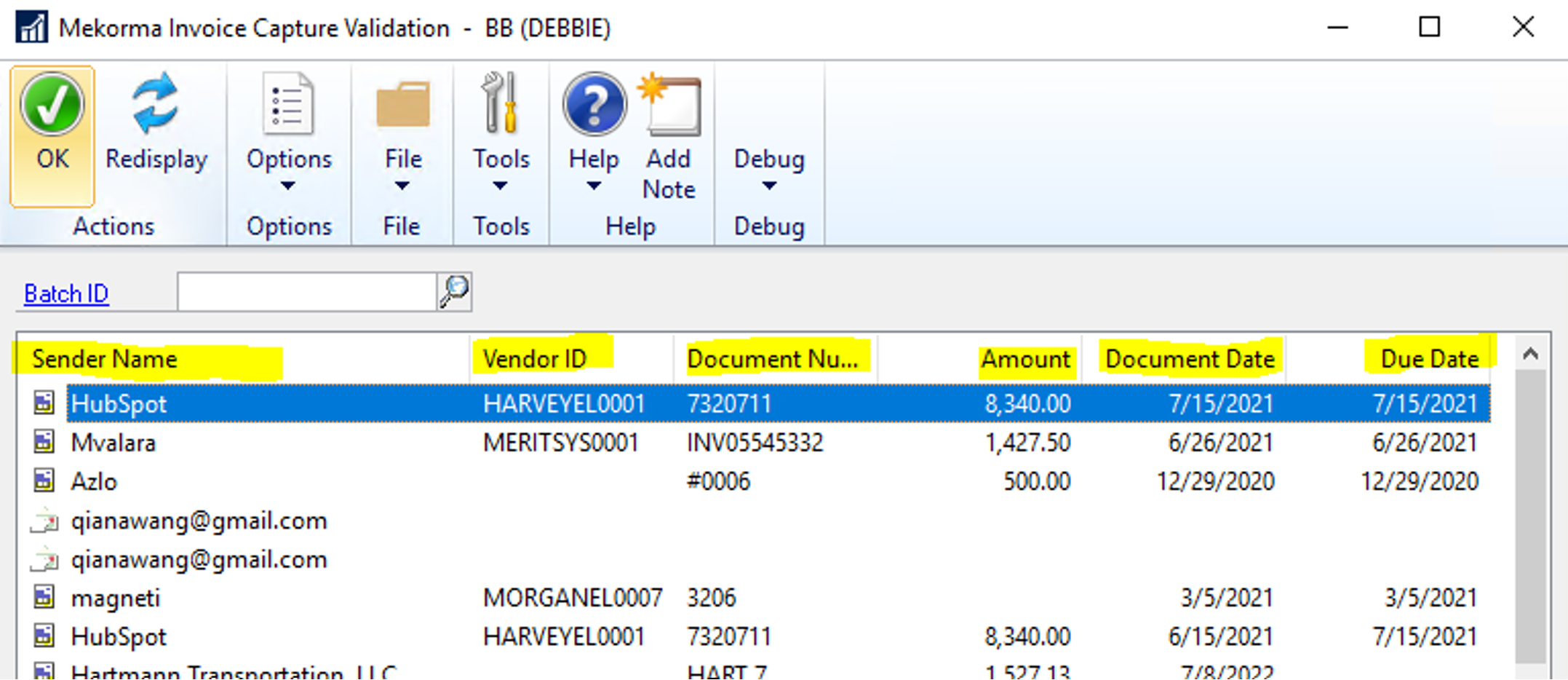
Sorting in the Validation Window
After invoice data is extracted by artificial intelligence (AI) and automatically submitted to Dynamics GP, the captured information is displayed in the Mekorma Invoice Capture Validation window. AP staff can then validate the transaction data accuracy, adjust the entry as needed and instruct the system to create a GP Voucher Transaction.
In x88, we’ve added the ability to sort the listed invoices by individual columns, which is helpful for companies that process a higher volume of invoices.
Create an invoice with the email body
Every invoice processed in the Invoice Capture Validation window includes both invoice attachments and email body content. A user can take various actions on the attachments by right-clicking:
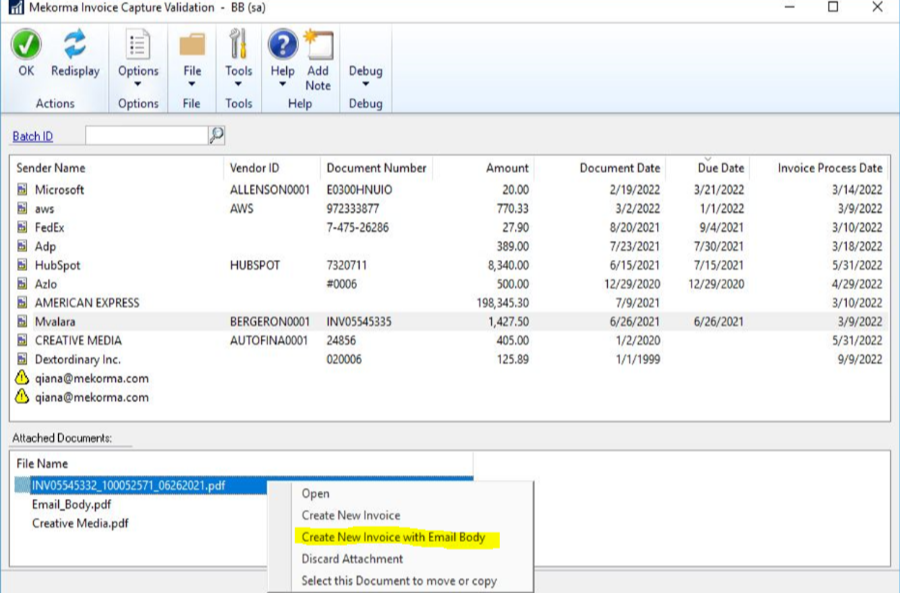
x88 introduces a new option called 'Create New Invoice with Email Body.’
Previously, when a user chose the option to create a new invoice, it only allowed the invoice attachment to be attached to the PM transaction. Our customers sometimes need to attach the email body content as well, and this new feature makes that possible.
Extract the Purchase Order (PO) number
Invoice Capture’s artificial intelligence capabilities will now extract the PO number from the invoice. After processing, the data will be brought to PO number field in Dynamics GP’s Payable Transaction window.
-number.png?Status=Master&sfvrsn=e4ef2a9b_6)
-number-2.png?Status=Master&sfvrsn=6f49ee35_3)
X88 New Features: Payment Hub Action Board
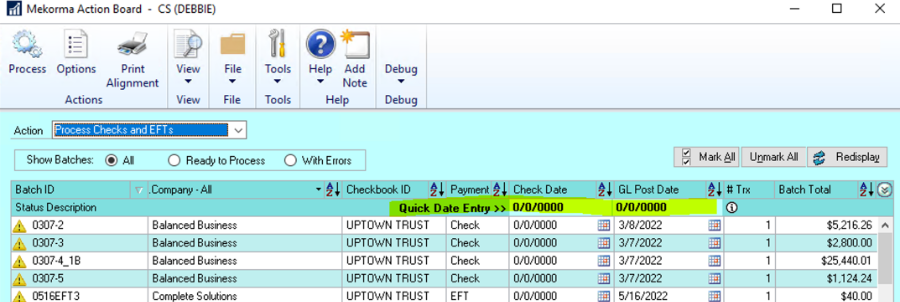
Quick Date Entry for Posting Batches
Some of our customers required an easier way to adjust the GL post date for batches that are processed at end-of-month. Previously, the Action Board functionality only allowed users to edit the post date one batch at a time.
Now you can save time by auto-filling the date change across all listed batches. The Quick Date Entry feature allows users to take the following actions on all selected batches simultaneously:
- Add date entry on Posting Date column header under Post Batches action.
- Add date entry on Check Date/Post Date column header under Process Checks and EFTs action.
The value entered in the header will automatically apply to all the batch lines being selected. When the new date is set on the line, the system will run a validation process (example: if the date falls within a closed period, a validation error (yellow triangle) will be displayed).
EFT: Foreign file format supported
When creating an EFT batch in GP, both domestic and foreign file formats are supported. Until now, the Payment Hub Action Board has only allowed processing for EFT batches configured with the domestic file format. To fulfill customer need, we have added support for foreign file formats.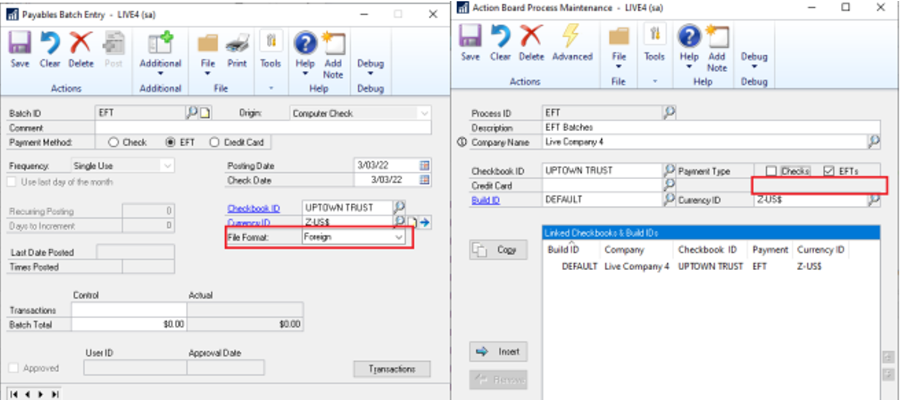
Mekorma Build x88 is now available for download on our website. For a complete list of all new features and bug fixes, see the x88 Release Notes.